
 Facebook
 Google
 GitHub
 Linkedin



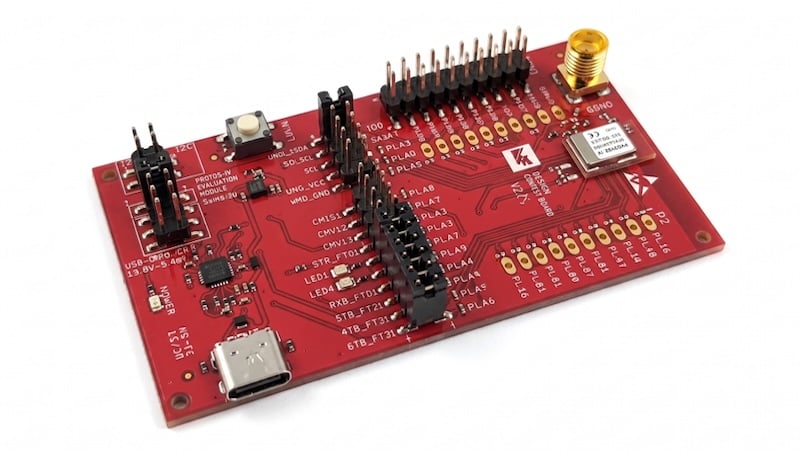
DigiKey & Würth Elektronik Proteus-IV Eval Board Design Contest
Project submissions end in...
to win 1 of 1 Grand Prizes.
Winners announced on January 15, 2027.
Use it. However you want.
No fixed theme. Let your creativity lead the way. Build a wearable, smart-home product, industrial monitoring solution, sensor node, or any innovative concept powered by Bluetooth® LE 6.0. The Proteus-IV evaluation board provides a pre-certified wireless platform and development resources, allowing you to focus on innovation instead of connectivity development.
Features of the Proteus-IV:
• Based on Nordic Semiconductor SoC nRF54L15
• Based on 128 MHz Arm Cortex-M33 processor
• Bluetooth® Low Energy 6.0
• Support all 4 Bluetooth Low Energy radio profiles
• Radio data rate up to 2 Mbps data rate
• Possible interfaces: UART
• Smart antenna configuration (Integrated PCB antenna with option to connect external antenna)
• Small form factor: 12 x 8 x 2.3 mm
• 1536 kB non volatile memory (NVM), 256 kB RAM
• Up to +8 dBm output power
• Up to 29 GPIOs, customized firmware
• 0.6 µA sleep current (system off mode)
• High temperature range -40 °C up to +105 °C
• Wireless Connectivity SDK
• With the WE Bluetooth LE Terminal App we provide you a fast and easy way of testing and also a base for your own app. Download it in the Google PlayStore® or in the Apple AppStore® or as source code on GitHub.
• Same hardware platform available as BYOF module
How To Enter
Use Proteus-IV in your design—there's no specific project focus, so get creative! Bonus points are awarded for incorporating multiple Würth Elektronik products into your submission.
For more details, please see application notes: ANR008, ANR016, ANR036
Terms and Conditions
Project Submission Prizes

1st Place: Prize of Your Choice - Up to $2500!
Choose your own prize! Select a product or gift card from your retailer of choice, up to $2500

2nd Place: Prize of Your Choice - Up to $1500!
Choose your own prize! Select a product or gift card from your retailer of choice, up to $1500

3rd Place: Prize of Your Choice - Up to $500!
Choose your own prize! Select a product or gift card from your retailer of choice, up to $500

MORPH: AN OS-AGNOSTIC MULTI-DEVICE KEYBOARD, MOUSE AND CLIPBOARD HANDLER
Most people now work across several machines at once, and the input hardware has not kept up. Desks accumulate duplicate keyboards and mice. KVM switches drag video through them. Software alternatives need an agent on every machine and one shared network.
MORPH is a small box built entirely around the Wurth Elektronik Proteus-IV, order code 2621011024000. Plug your own wired USB keyboard and mouse into it once, and it presents itself to up to four computers at the same time as an ordinary Bluetooth LE HID keyboard and mouse, with nothing installed on any of them. It is OS-agnostic for a concrete reason: MORPH speaks only standard HID over GATT, which every current desktop and mobile platform already implements. Anything that pairs with a Bluetooth keyboard works.
It is also a translation layer: the same physical shortcut produces the right result on each platform, because the modifier conventions get reconciled inside the box rather than inside the user’s fingers. Pointer speed is scaled per machine.
Mirror mode sends the same keystrokes to every connected machine at once, for a bench of devices under test or a room of identical machines. Stored snippets type into any machine with nothing installed, and an optional helper adds a shared clipboard between desktops over the existing Bluetooth link.
USING THE PROTEUS-IV
The module is the entire product, not a radio attached to a computer. Its nRF54L15 has no USB peripheral, so keyboard and mouse are read through two MAX3421E USB host controllers on SPI, which is precisely what up to 29 GPIOs with customized firmware makes possible. A WIZnet W5500 on a second SPI bus serves the setup page. Configuration lives in the module’s RRAM through Zephyr’s ZMS layer, so pairings, profiles and layout survive power loss.
WURTH ELEKTRONIK CONTENT
- Proteus-IV module, 2621011024000, and Proteus-IV EV-Kit, 2621129024001
- Himalia 2.4 GHz antenna, 2600130021, brought in on the EV-Board SMA by swapping the C1/C2 capacitor position, for a direct comparison against the integrated PCB antenna
- 32.768 kHz crystal, 830009706, fitted at the Q1 footprint. Optional: the internal RC oscillator is specified at 250 ppm where Bluetooth allows 500 ppm, so it is measured as a comparison rather than assumed
- MagI3C VDMM step down power module, 171010550, for the 3.3 V rail
- WE-TVS ESD protection, 82400152, and WE-CBF ferrites, 7427927311, with WE-CNSW common mode chokes on the USB pairs
- USB Type-C receptacle 629722000214 and pin headers 61030421121
- Status LEDs 150080YS75000, buttons 430152043826, and WE MLCC decoupling
Only three ICs in the whole design are not Wurth parts: the two MAX3421E controllers and the W5500.
SETTING IT UP
1. Plug your keyboard and mouse into MORPH. They work straight away against whatever is already paired, so setup never leaves you without input.
2. Press the setup button. An LED confirms setup mode, which times out if you walk away.
3. Connect an Ethernet cable, either to one machine at a time or to a switch reaching all of them.
4. Open the setup page in a browser on each machine in turn. Each one registers itself: confirms which operating system it is, walks you through Bluetooth pairing, and asks how the clipboard should behave.
5. Choose how you want to switch. Hotkey switching needs nothing further. Edge travel opens a canvas of every screen from every machine, which you drag into the arrangement they physically sit in.
6. Unplug the cable. That is the end of setup.
From then on the box is a keyboard and mouse. A hotkey or button moves your input between machines, or you push the pointer off a screen edge onto the next one. A second button switches to mirror mode.
Underneath, each machine has its own Bluetooth identity and bond, so they never see one another and each remembers MORPH independently. All four links stay connected while idle, which is why switching is immediate rather than a reconnect. The profile for the destination machine is a small table in the module’s memory, applied to every report on its way out, and that is where the key translation happens. Because the settings live in non-volatile memory, a power cut changes nothing: the box comes back already paired, already remapped, already arranged. With the cable out there is no setup interface at all.
This entry is a proof of concept on the EV-Kit, with the SPI controllers on breakouts and the Wurth parts hand-assembled onto an interface card, rather than a fabricated PCB. It needs custom firmware, since the stock Proteus-IV firmware is a UART command interface product (ANR008) rather than a HID one; ANR036 sets out the Zephyr path.
Firmware, setup page, design files and measured results published open source.
Using the Proteus-IV module as a drop in replacement for BLE FTMS Services.
EdgeSense — AI-Powered Local Automation
System Architecture
The proposed system is implemented as a distributed edge-AI and Bluetooth-based automation system. The vision-processing unit can be developed using a Raspberry Pi, Arduino UNO Q, or local PC, depending on the computational requirements of the selected AI model.
The vision unit captures the surrounding environment through a camera and processes the video locally using a computer-vision/AI model. Instead of continuously transmitting raw video, the system extracts useful information such as crowd level, number of people, occupancy status, or detected environmental conditions. Only the processed status information is transmitted wirelessly, reducing communication bandwidth and improving privacy and security.
The processed status is transmitted to the Proteus-IV Evaluation Board through a wireless communication interface. The Proteus-IV board combines this information with data received from the user’s smart device and determines the appropriate control action for connected appliances.