Facebook
 Google
 GitHub
 Linkedin
At Embedded World, Renesas 365 Advances to General Availability Phase
The Renesas 365 Development platform unifies electronics design from MCU recommendation to validation.
At Embedded World 2026, Renesas announced general availability of its new cloud-based development tool, Renesas 365. The platform combines development and validation tools with model-based assistant functionality to create an end-to-end MCU hardware and software development environment. The platform works with Altium Designer for schematic and PCB layout, e²studio and VSCode for software development, and Motor Studio for application specific motor control development.
Press Conference at Embedded World
At the exhibition, Renesas held a press conference discussing the news. The three Reneas speakers were Mohammed Dogar, Vice President, Embedded Processing, Leigh Gawne, Vice President, R&D, Digital Industries, and Hooman Foroughi, Vice President and Head of Applications and Systems Engineering.
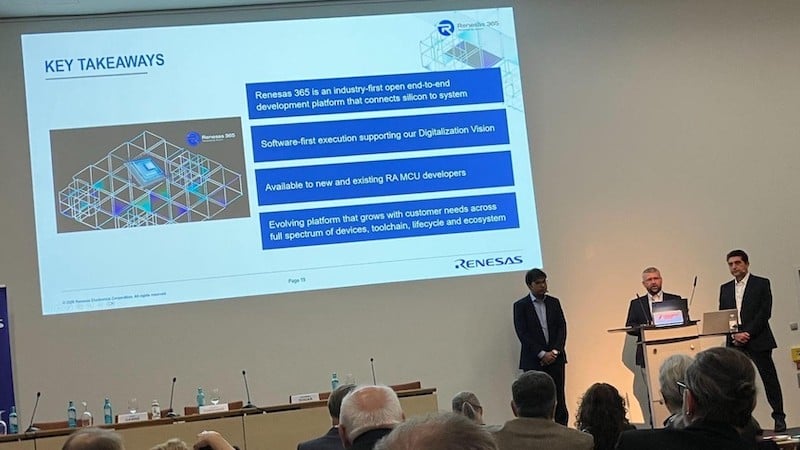
Renesas 355 press conference at Embedded World 2026. From left to right, Mohammed Dogar, Leigh Gawne, and Hooman Foroughi. All About Circuits image.
Embedded systems design, even in 2026, is a fragmented and complex multi-disciplinary endeavor. MCU selection is often heavily influenced by parameters that are not visible until well into the hardware and software development phases. Teams from different design disciplines often struggle to keep up with decisions and dependencies outside of their control.
This can lead to conflicts between hardware, software, mechanical, and supply chain efforts. Renesas 365 was introduced to bring all of those challenges under one umbrella to mitigate communication challenges and prevent competing requirements.
Start to Finish Workflow
Renesas 365 is more than just an IDE and language set. It sits above the e²studio integrated development environment (IDE), Flexible Software Package (FSP), and smart documentation to manage the development workflow from start to finish.
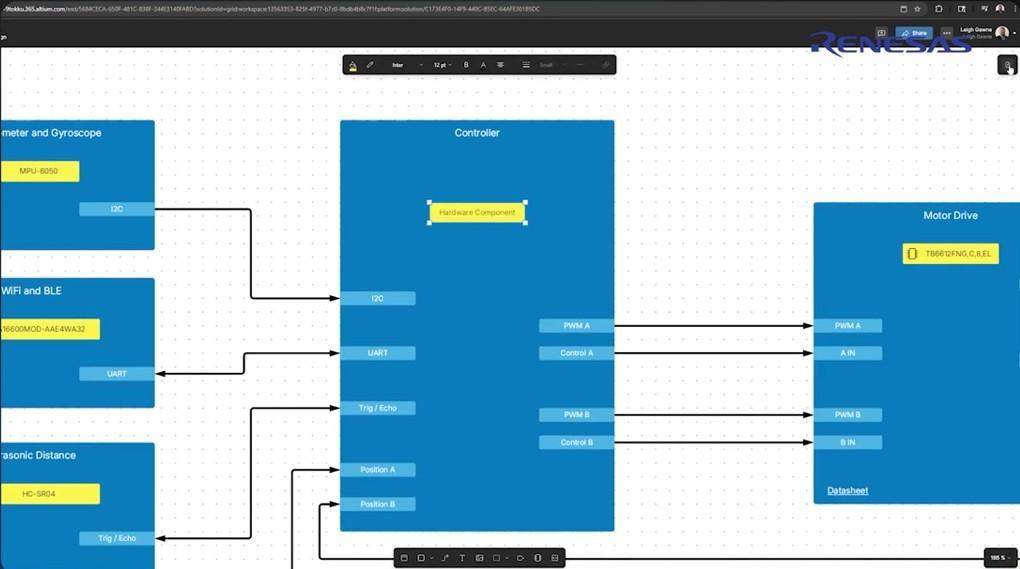
Electronics System Designer in Renesas 365. (Click on image to enlarge).
Electronics System Designer (ESD) resides at the heart of the system. It allows for visual construction of the functional aspects of the system. Peripherals and the MCU can be connected visually based on I/O and system functional requirements. Figure 1 shows a motor controller system in development with sensor and communications chips on the left, an MCU in the middle, and motor driver on the right.
At this stage, Renesas 365 allows the required peripherals to be connected before the specific MCU has been chosen. Information about peripheral types and communications protocols is used to create a block diagram of functional requirements. The MCU will be selected later based on these system needs.
Help With MCU Selection
One of the highlights of Renesas 365 is MCU selection assistance. Renesas offers more than 550 processors in the RA family of microcontrollers alone. Selecting the best MCU for a design is often a difficult and time-consuming task with a far greater “emotional” component than electronic design deserves. Engineers often start with a particular MCU family simply because they’ve used it before, not because it is best for the job.
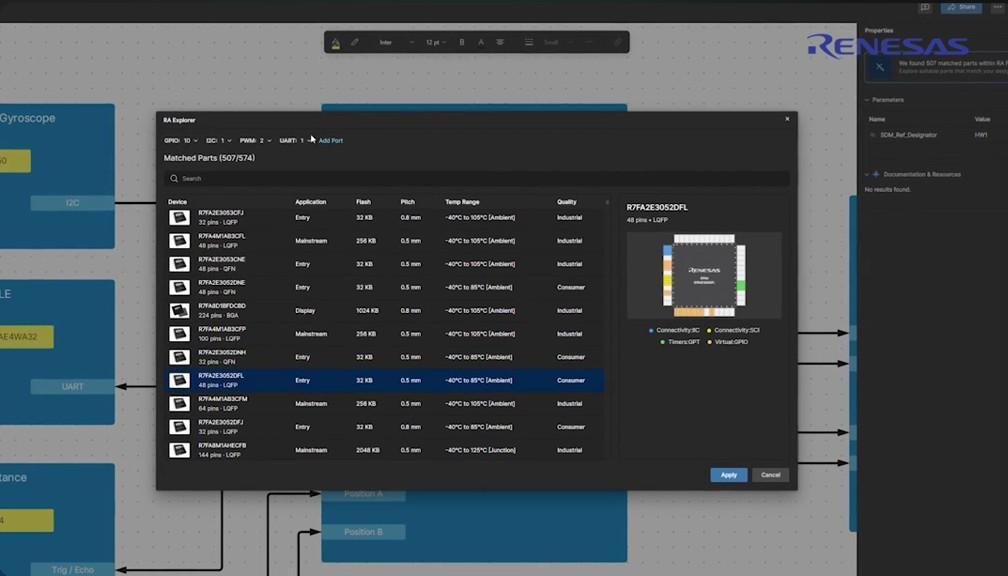
RA Explorer guides the MCU choice based on information given to Electronics System Designer. (Click on image to enlarge).
Such a familiarity-based decision process may avoid potentially hours or days digging through datasheets and difficult search engines, but it is a process born of frustration, not of efficiency. It often means that new MCUs or variants better suited to the specific project requirements are missed. Most parametric search tools fail to capture nuance in specification needs.
To solve this problem, Renesas 365 includes an intelligent MCU selection tool, RA Explorer. It operates based on AI-assisted constraint modeling rather than simple parametric searching. Taking off from the information put into ESD, RA Explorer chooses a candidate MCU and internally models the parameters and configuration to ensure that the device will work as needed. The MCU selection can be revisited or later updated based on software requirements or updated specifications.
Design Workflow
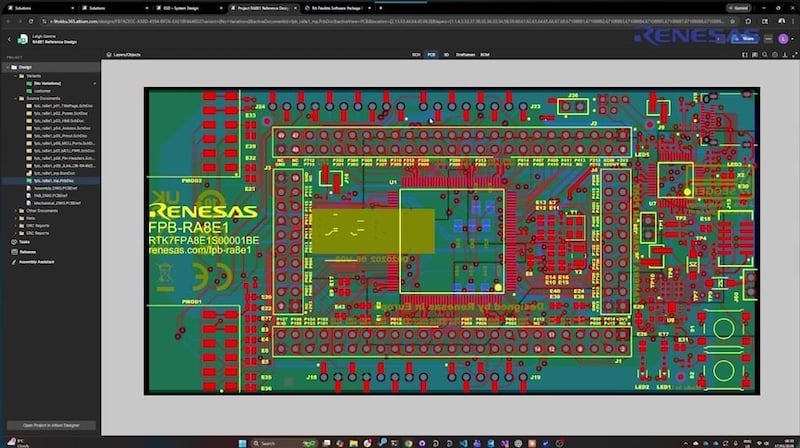
Altium Designer operating within the Renesas 365 browser-based development environment
Renesas 265 comes with a multi-purpose browser-based IDE. It works with partner tools allowing better management of all aspects of the design. As a cloud-based platform, it is ready made for team development cooperation and coordination. Key features include:
- Model-based component and system exploration, discovery and selection
- Digital continuity across systems, hardware and software workflows
- AI-assisted guidance on design constraints, resource management, and error resolution
- Over-the-air (OTA) device management for RA MCUs
Software Build, Deploy, Debug, and Lifecycle
Further integration for Renesas 365 comes with the integration of software toolchains such as e²studio and VSCode. Motor Studio is also integrated to allow for optimization of motor control hardware and software. In addition to drag and drop configuration, the IDE allows for conventional code development and seamless integration between code and visual development modules.
The IDE handles development, compilation, and debugging. Once coded, it can perform software to hardware cross probing to validate the design choices. At any point in the development cycle, the MCU choice can be reevaluated and changed if necessary.
Renesas 365 functionality doesn’t end with design. It also operates as a lifecycle management tool. It can manage industrial grade over the air (OTA) updates and has fleet management tools included.
Renesas 365 is available for download and use now. It supports existing projects in addition to clean-sheet new projects.
All images used courtesy of Renesas, unless otherwise specified.