Facebook
 Google
 GitHub
 Linkedin
Pickering Unwraps Free Toolset to Streamline ATE Signal Path Workflow
Announced today, the free cloud-based toolset replaces spreadsheets with graphical signal path design for automated test engineers.
Today, Pickering Interfaces has launched Test System Architect (TSA), a free, cloud-based graphical toolset designed to tackle one of automated test engineering's most persistent bottlenecks: designing, documenting, and deploying the signal path.
Available now, the platform integrates system configuration, schematic design, cable design, product selection, and microwave switch design into a single environment built on a centralized database, replacing the spreadsheets and email chains that currently define the industry's standard practice.
More Than a Configurator
"This is the most important software launch that we've ever had as a company," said Kyle Voosen, Global Product Marketing Manager at Pickering T&M, in an exclusive interview with All About Circuits.
Voosen goes on to explain that test engineers spend roughly 25% of their time designing, wiring, and troubleshooting the signal path between instruments and devices under test, a challenge he describes as "underappreciated" and one that, until now, has had no dedicated tooling.
Hardware, Voosen notes, typically represents less than half the total cost of an automated test system. The harder problem is the engineering, integration, and assembly effort needed to get that hardware into production. TSA is Pickering's attempt to address that gap directly.
The Spreadsheet Problem
Ask a test engineer how they currently define their signal routing, and the answer is usually a spreadsheet. Each endpoint gets mapped manually—instrument terminals on one side, device-under-test pins on the other—and in large systems, those spreadsheets can run to thousands of rows.
"I can guarantee you, if there's a mistake anywhere in there, you'll never find it," Voosen said. "You'll never see the mistake."
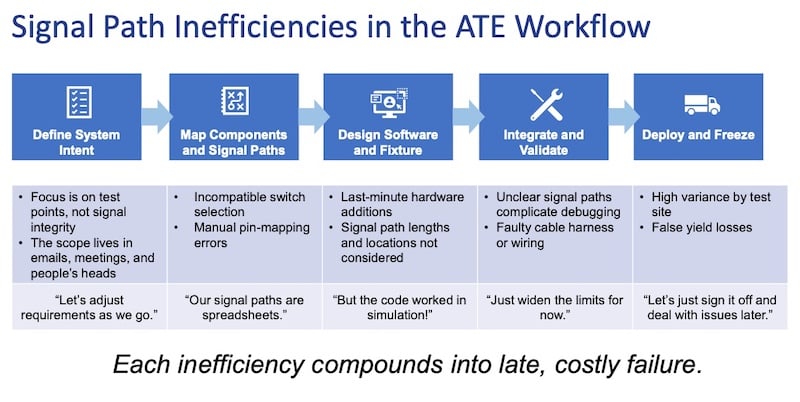
The TSA toolset addresses the many inefficiencies that plague today’s ATE workflow.
The consequences, however, go beyond documentation errors. Voosen describes a scenario familiar to many test engineers, whereby two nominally identical PCBAs run through the same test system, one with a one-foot signal path and another with a two-meter path. Simulation says both should pass.
On real hardware, one fails. The culprit is signal integrity degradation across the longer path, and that’s a problem that only becomes apparent when the physical topology is considered as part of the design, not as an afterthought.
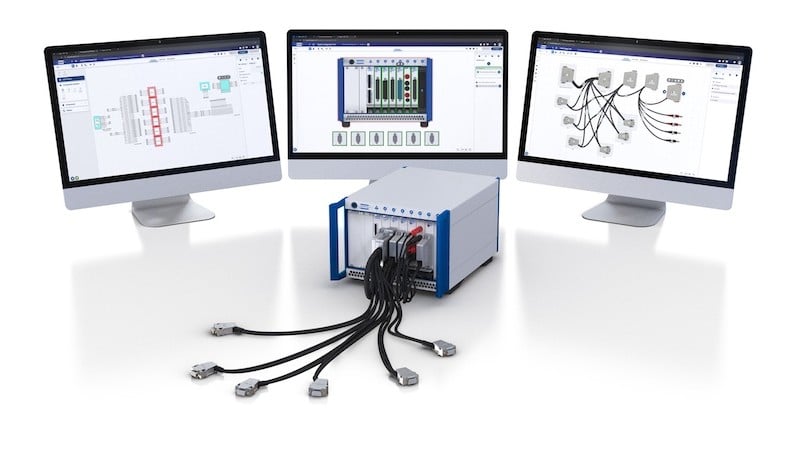
Pickering’s TSA tool makes the signal path graphically explicit from the start.
TSA addresses this by making the signal path graphically explicit from the start. Engineers define system endpoints in the System Configuration Tool—PXI, PXIe, or LXI chassis populated with Pickering modules alongside third-party instruments and modeled devices under test—then move to the Schematic Design Tool to graphically interconnect everything. The schematic, rather than a spreadsheet, becomes the single source of truth for the entire project.
"There is no other tool out there that helps the engineers make these signal paths in a visual format." National Instruments, Voosen notes from his own 20-plus years there before joining Pickering, stops at the instrument boundary. "The cables and the connectivity and the signal path—that's not their world."
From Schematics to Build
Once the schematic is complete, TSA's Cable Design Tool uses the defined endpoints and connector types to automatically generate cable harness specifications, such as connector types, wire gauges, pin assignments, and cable lengths, and exports them as a build document that can go directly to any cable manufacturer, not just Pickering. "We give this to you free of charge," Voosen said. "This is actually what we prefer if you hand us this, but you can take it anywhere."
The platform auto-generates wiring schematics, pin-to-pin lists, BOMs, and datasheets, reducing documentation that previously took hours to seconds. Version control and revision history are built in, with all designs stored in Pickering's private cloud. An integrated project manager allows engineers to collaborate with colleagues, third-party system integrators, and Pickering's own engineers within the same environment.
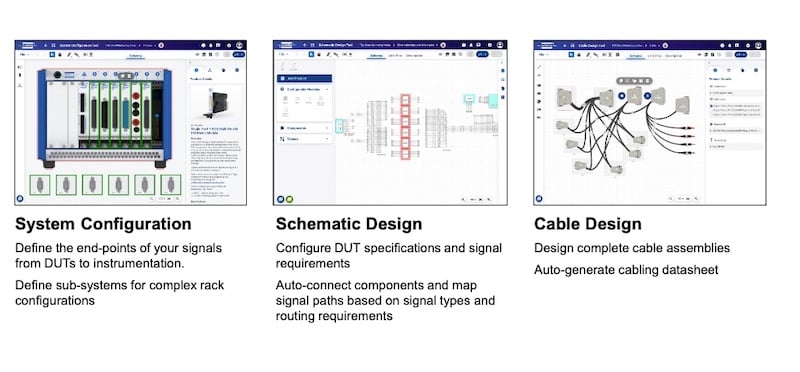
TSA toolset handles the 3 key tasks in ATE workflow: system configuration, schematic design, and cable design.
For organizations still running legacy equipment, the Product Selector includes a Migration Tool that maps obsolete VXI and GPIB hardware to functionally equivalent PXI modules. In industries like aerospace, defense, and medical, where test systems are validated once and then expected to run for decades, the ability to migrate a legacy design while maintaining a documented, traceable signal path is a practical necessity.
TSA grew partly from internal tooling that Pickering had already developed for cable co-design work with customers, but the decision to release it publicly and to keep it free permanently is a deliberate move. "The owner is adamant that we will never charge for this," Voosen said. "We're a hardware company. We're not in the game of subscription-based SaaS tools."
An auto-routing feature and LLM-assisted product selection are on the roadmap, though Voosen was careful to note that signal path routing will remain deterministic: "I don't want fuzzy logic on this step because I want the pin-out to be the pin-out the same every time,” he said.
All images used courtesy of Pickering Interfaces.
Related Content