Facebook
 Google
 GitHub
 Linkedin
Why Component Availability Belongs Inside Schematic Design
Checking part availability only after the schematic is done invites costly redesigns. Here's how moving that check into the design phase itself avoids the risk.
Checking component availability at the very end of a project is a trap. Engineers spend weeks perfecting a schematic; they run simulations, verify constraints, and get the design working on screen. Then they hand the bill of materials over to procurement. That sometimes signals the point where the project hits a wall.
Picture this scenario: a critical microcontroller is completely out of stock, or a specific power IC has a 52-week lead time. Suddenly, the team has to redesign the board, update the documentation, and delay the product launch.
This happens all the time, and here’s the problem: checking component availability after you finish the schematic introduces a massive, avoidable risk of redesign. The electronics supply chain remains highly volatile—industry lead times for vital components jumped from 8–12 weeks in early 2020 to a whole year by late 2022, and plenty of uncertainty remains heading into 2026. Waiting until the end of the design phase to verify stock is a gamble you usually lose.
So, the solution? To flip the process around. By moving part search and supply chain checks into the schematic phase, teams can catch shortages before committing components to a design, potentially eliminating risk.
The Engineering Problem: Designing in the Dark
Traditionally, engineering and procurement operate in silos. Electrical engineers work in their CAD tools, while sourcing teams live in spreadsheets.
An engineer picks a part from a local library because it fits the technical requirements. They place the symbol on the schematic. They might not know that the manufacturer flagged the part as NRND three months ago.
When the procurement team finally receives the BOM, they must source each line item. If a part is unavailable, they ask the engineer for a drop-in replacement. If no direct replacement exists, the engineer has to alter the schematic, change the PCB footprint, and route the board all over again.
And that's why it matters. Every redesign cycle wastes hours of engineering time. It also pushes back prototyping and manufacturing schedules, costing the company money.
Why Legacy Approaches Break Down
The old way of working relies on static libraries and manual checks.
Engineers often pull components from a company library that someone updated two years ago. The technical specs are right, but the commercial data is dead; the part might have been cheap and plentiful then, but today it is obsolete.
To verify stock, an engineer has to leave their design tool, open a web browser, and check distributor websites one by one. Or they compile a spreadsheet and email it to a buyer. This manual process takes too much time, so engineers often skip it. They design the board and hope for the best.
So, what happened? As projects multiplied and supply chains tightened, this manual coordination failed. The crushing administrative overhead robbed engineering teams of the time and energy they needed for actual design work. Teams realized they needed a better way to see component data early in the process.
A Better Technical Workflow: In-Design Part Search
A practical approach moves the supply chain check directly into the schematic capture phase. In other words, you don't wait for a final BOM review; you vet the part before you place it on the page.
To be useful, a search needs to show real-time stock across multiple distributors, current pricing, lead times, and compliance information. It also needs to provide technical attributes, accurate footprint data, risk indicators, and lifecycle status.
But having that data is only the first step. When a shortage hits, the immediate question is usually: how do I check component availability and lead time during schematic design to avoid future supply chain issues? The answer is to move away from static local libraries and use an integrated cloud portal connected to your ECAD software. Instead of guessing, you see live data. If a part has a 40-week lead time, you know immediately. You can then search for a similar component that has 50,000 units sitting in a warehouse right now.
Finding stock is only half the battle; avoiding obsolete parts is the other. A common workflow question engineers face is: How do I filter part search results by lifecycle status to avoid selecting end-of-life components? Search tools now address this by letting you set strict parameters. You configure the search panel to exclude any part marked as obsolete or NRND. You only see active components. This simple filter prevents dead parts from entering your design in the first place.
Which PCB Design Platforms Have Integrated Part Search With Live Distributor Pricing and Lifecycle Status?
The EDA industry has responded by merging design tools with supply chain data. Several major players now offer this, though their approaches vary heavily based on their architectures. Let’s look at one example, namely Altium.
Altium embeds supply chain intelligence directly into the design workflow rather than treating it as a separate lookup step. The part intelligence layer pulls from Octopart's data across 679 distributors and more than 95 million parts. This gives engineers instant access to pricing and availability without leaving their design environment.
The data goes beyond availability. Lifecycle status, compliance details (RoHS, REACH SVHC), and technical parameters come from a combination of Octopart and IHS Markit. Stock and pricing update daily, and lifecycle data refreshes weekly. When a part becomes unavailable or obsolete, cross-referenced alternatives surface with confidence ratings. This helps engineers maintain design integrity without starting a sourcing search from scratch.
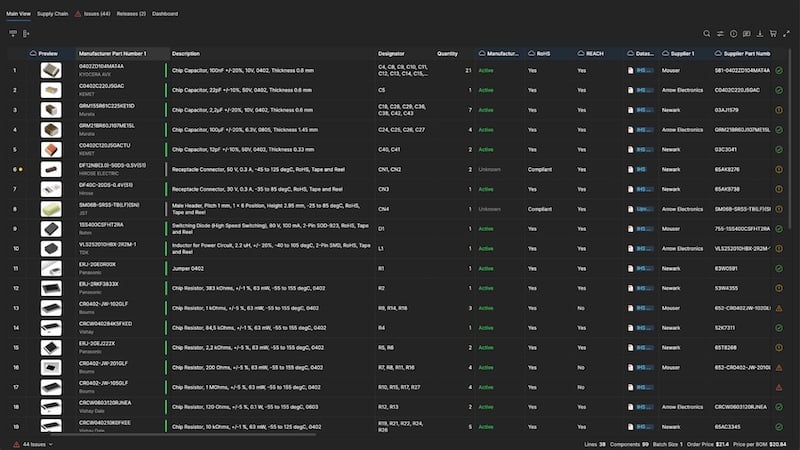
Updates to critical lifecycle information and supply chain data in Altium. Image used courtesy of Altium
By linking the design environment directly to an aggregator that pulls real-time intelligence from major distributors, the workflow changes completely.
When an engineer hits a roadblock and wonders, “How do I search for a component with in-stock availability across multiple distributors from inside my schematic editor?” They do not have to leave their CAD tool or open a web browser.
Instead, they open the supply chain panel right next to their active schematic. When you type a standard query, the system returns a list of viable parts. The engineer can instantly see who has the part, what it costs, and the current stock levels. This setup helps teams manage BOMs with a live connection to supply chain data. It saves hours normally wasted comparing prices across different distributor websites.
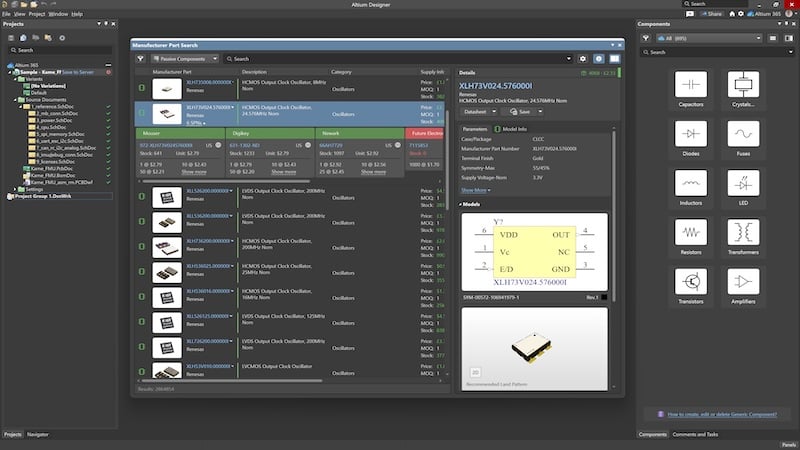
Live pricing, stock, and lifecycle data from multiple distributors are displayed alongside the component's schematic symbol and footprint. Image used courtesy of Altium
Component selection, then, becomes a collaborative decision. Live availability and risk data remain visible to both the engineer and the procurement team, keeping everyone on the same page. An engineer can confidently place a symbol on the schematic knowing the part is sitting on a warehouse shelf ready to ship.
Practical Implementation Steps
If your team wants to stop redesigning boards because of missing parts, you need to change how you select components. This might work for you:
- Connect your library to live data. Stop relying on static local libraries. Use a system that links your schematic symbols to real-world manufacturer part numbers (MPNs).
- Define approved lifecycles. Set rules for your engineering team. Mandate that every new component added to a design must have an "Active" lifecycle status.
- Check stock during part selection. Train engineers to view inventory levels before placing a part. If a component has low stock across all distributors, find an alternative immediately.
- Integrate procurement early. Give sourcing teams access to the BOM while the schematic is still in progress. They can flag risky parts weeks before the layout is finished.
- Use component templates. Standardize how parts are created. Use templates to ensure every component has the necessary sourcing information attached from the start.
By bringing supply chain reality into the schematic phase, you build resilient designs, you stop wasting time on rework, and you get your products to market faster.
Key Takeaways
- Checking part availability at the end of the design cycle leads to costly redesigns and missed deadlines.
- Electronic design automation tools pull live distributor data directly into the design environment.
- Engineers can filter for in-stock and active components to prevent end-of-life parts from breaking production.
Frequently Asked Questions
Do I Need a Full PLM System to Get Live Component Data in My CAD Tool?
No. While large companies often use PLM integrations to manage their entire product lifecycle, many PCB design tools offer direct API connections to component search engines without requiring a heavy PLM deployment.
What Happens if a Part's Lifecycle Status Changes After I Order the Boards?
If a part becomes obsolete after manufacturing begins, you will need to rely on your existing inventory or spot-buy from brokers. To prevent this, a structured workflow should include running a final BOM health check right before issuing purchase orders to catch any last-minute lifecycle shifts.
Are There Differences in Data Quality Between Component Search Tools?
Yes. Some aggregators update pricing and stock once a day, while others pull live data directly from distributor APIs. Platforms that normalize their data and provide risk indicators generally offer more reliable insights for design decisions.
Related Content