
 Facebook
 Google
 GitHub
 Linkedin
AC Electric Circuits
Oscilloscope Trigger Controls
15 questions By Tony R. Kuphaldt
-
Question 13 of 15
Suppose you were looking at this waveform in an oscilloscope display:

This is a difficult waveform to trigger, because there are so many identical leading and trailing edges to trigger from. No matter where the trigger level control is set, or whether it is set for rising- or falling-edge, the waveform will tend to “jitter” back and forth horizontally on the screen because these controls cannot discriminate the first pulse from the other pulses in each cluster of pulses. At the start of each “sweep,” any of these pulses are adequate to initiate triggering.
One triggering control that is helpful in stabilizing such a waveform is the trigger holdoff control. Explain what this control does, and how it might work to make this waveform more stable on the screen.
Reveal answerThe “holdoff” control sets an adjustable period of time after each trigger even where subsequent events are ignored.
Notes:A purposefully minimal answer (as usual!) is shown in the answer section for this question. Understanding how holdoff works may very well require hands-on experience for some students, so I highly recommend setting up a demonstration in the classroom to use while discussing this oscilloscope feature.
-
Question 14 of 15
A technician is measuring two waveforms of differing frequency at the same time on a dual-trace oscilloscope. The waveform measured by channel Ä” seems to be triggered just fine, but the other waveform (channel “B”) appears to be untriggered: the waveshape slowly scrolls horizontally across the screen as though the trace were free-running.
This presents a problem for the technician, because channel B’s waveform is the more important one to have “locked” in place for viewing. What should the technician do to make channel B’s display stable?
Reveal answerSwitch the trigger source control from Ä” to “B”.
Follow-up question: if the above advice is taken, channel B’s waveform will become “locked” in place, but channel A’s waveform will now begin to scroll across the screen. Is there any way to lock both waveforms in place so neither one appears to scroll across the screen?
Notes:Like so many oscilloscope principles, this is perhaps best understood through actually using an oscilloscope. Try to set up two signal generators and an oscilloscope in your classroom so that you may demonstrate these controls while discussing them with your students.
-
Question 15 of 15
Another challenging sort of waveform to “lock in” on an oscilloscope display is one where a high-frequency waveform is superimposed on a low-frequency waveform. If the two frequencies are not integer multiples (harmonics) of each other, it will be impossible to make both of them hold still on the oscilloscope display.
However, most oscilloscopes have frequency-specific rejection controls provided in the trigger circuitry to help the user discriminate between mixed frequencies. Identify these controls on the oscilloscope panel, and explain which would be used for what circumstances.

Reveal answer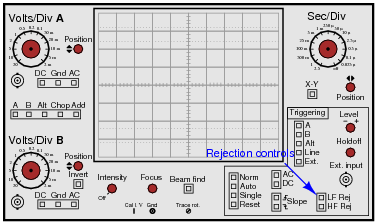
Follow-up question: identify the filter circuits internal to the oscilloscope associated with each of these “rejection” controls.
Notes:Finding the controls on the oscilloscope panel should present no difficulty for most students, at least once they realize what the controls are called. The key to answering this question is to research the words “rejection” and “trigger” in the context of oscilloscope controls.






response are clear, thank you