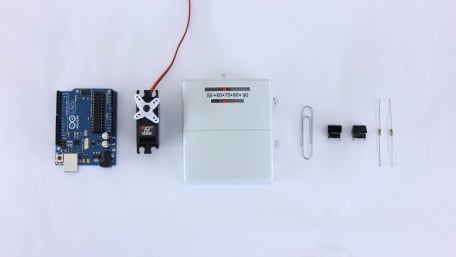
Programmable thermostats can save a lot of energy and money. But you don't have to buy one- you can convert an old mechanical thermostat into a programmable…
Programmable thermostats can save a lot of energy and money. But you don't have to buy one- you can convert an old mechanical thermostat into a programmable thermostat using an Arduino and a servo.

Use the Analog to Digital Converter (ADC) feature of LaunchPad to build a laser tripwire alarm. This is a great way to…
Use the Analog to Digital Converter (ADC) feature of LaunchPad to build a laser tripwire alarm. This is a great way to familiarize yourself with LaunchPad while simultaneously making something cool.

Programmable thermostats can save a lot of energy and money. But you don't have to buy one. You can convert an old…
Programmable thermostats can save a lot of energy and money. But you don't have to buy one. You can convert an old mechanical thermostat into a programmable thermostat using an Arduino and a servo.

Texas Instruments' LaunchPad makes developing applications with MSP430 microcontrollers easy and fast. Learn all about it…
Texas Instruments' LaunchPad makes developing applications with MSP430 microcontrollers easy and fast. Learn all about it and create your first application.

This handy introduction teaches you all about the RFM69HW transceiver module using two circuits running a wireless…
This handy introduction teaches you all about the RFM69HW transceiver module using two circuits running a wireless version of the "blinky" code.

Learn how to use a rotary encoder in an Arduino project. Rotary encoders are electromechanical, electro-optical or…
Learn how to use a rotary encoder in an Arduino project. Rotary encoders are electromechanical, electro-optical or electro-magnetic devices which convert rotational motion into digital or analog information.

Learn how to use a 433MHz RF module with an ATMega 328P-PU. In this article, we'll make a circuit with a DHT11 sensor and…
Learn how to use a 433MHz RF module with an ATMega 328P-PU. In this article, we'll make a circuit with a DHT11 sensor and a RF transmitter. We'll also make a receiving circuit with a 433MHz RF receiver and an LCD display.

This article explains how to install PyVisa and MatPlotlib for Python. PyVisa connects a computer to the measurement…
This article explains how to install PyVisa and MatPlotlib for Python. PyVisa connects a computer to the measurement instruments and matplotlib helps to visualize the data collected from these instruments.

Use a WS2812 RGB LED strip to visualize the pose of an MPU-6050 6-degree-of-freedom IMU in three dimensional space.
Use a WS2812 RGB LED strip to visualize the pose of an MPU-6050 6-degree-of-freedom IMU in three dimensional space.

Create a wireless "relative comfort" light bar thermometer by broadcasting temperature data across multiple ESP8266…
Create a wireless "relative comfort" light bar thermometer by broadcasting temperature data across multiple ESP8266 modules running NodeMCU using MQTT.

This article will show you one way of making an accurate clock by using the Real Time Clock IC DS1307. The time will be…
This article will show you one way of making an accurate clock by using the Real Time Clock IC DS1307. The time will be shown on a LCD display.

MQ Telemetry Transport (MQTT) is a popular low-overhead messaging protocol used by many IoT devices to communicate. This…
MQ Telemetry Transport (MQTT) is a popular low-overhead messaging protocol used by many IoT devices to communicate. This tutorial will show the user how to to set up a basic MQTT network using Python on his or her computer and an ESP8266 running the NodeMCU firmware.

Adding variable speed control and battery monitoring to a Power Wheels truck!
Adding variable speed control and battery monitoring to a Power Wheels truck!

Part 1 in the “How to Make an EFM8-Based Sound Synthesizer” series, which will design a sound synthesizer that can…
Part 1 in the “How to Make an EFM8-Based Sound Synthesizer” series, which will design a sound synthesizer that can play standard musical notes. We will accomplish this using a low-cost, small-form-factor EFM8 microcontroller in conjunction with a few external components and a speaker.

Learn how to set up the Wunderbar platform to begin building your own IoT apps. This will demonstrate the "Can't Touch…
Learn how to set up the Wunderbar platform to begin building your own IoT apps. This will demonstrate the "Can't Touch This" and "Tell Me When" demo applications to measure WunderBar sensors and perform actions based on them. Some of the major bugs are discussed.

Getting started with PSoC®, the Programmable-System-on-Chip by Cypress Semiconductor for developing and testing embedded systems.
Getting started with PSoC®, the Programmable-System-on-Chip by Cypress Semiconductor for developing and testing embedded systems.

Beaglebone Black is the most recent incarnation of the Beaglebone open source hardware platform. For less than $50, the…
Beaglebone Black is the most recent incarnation of the Beaglebone open source hardware platform. For less than $50, the board includes Ethernet, graphics processing, 4Gb of nonvolatile storage, and ports supporting USB, HDMI, and Beaglebone's custom I/O add-ons, called "capes". Here's how to run some simple commands to toggle digital I/O on the board!

Part 2 in the "How to Make an Ambient Light Monitor" Series. Our smart ambient light monitor will need to digitize and…
Part 2 in the "How to Make an Ambient Light Monitor" Series. Our smart ambient light monitor will need to digitize and analyze signals from an optical detector, so it is time to explore the EFM8’s integrated analog-to-digital conversion functionality.

Learn how to connect your device with Linux Screen using the built-in Lua interpreter to set up the file system and…
Learn how to connect your device with Linux Screen using the built-in Lua interpreter to set up the file system and connect to the network. Then, learn how to automate the scripting process with Luatool and put it all together with a basic TCP server that can interact with a pulse-width modulated LED, a potentiometer, and a switch.

Compile and install NodeMCU on the ESP8266 IoT chip using Linux tools and the ESP Open Source SDK
Compile and install NodeMCU on the ESP8266 IoT chip using Linux tools and the ESP Open Source SDK


 Facebook
 Google
 GitHub
 Linkedin